01
CONTROL
Virtual KDU and radio controls
Operate the radio’s keypad and read its display on your Android phone or EUD.
Android app for L3Harris radios
Linkborne is an Android app that puts a supported L3Harris tactical radio’s web interface on your phone. Use the virtual keypad and display unit (KDU), transfer files, and access the voice and video functions your radio supports.
Designed for compatible Harris radios with a Web UI. Current beta testing focuses on the RF-7850M family. Keep the radio where it belongs and use your handheld or mounted phone as the control screen.
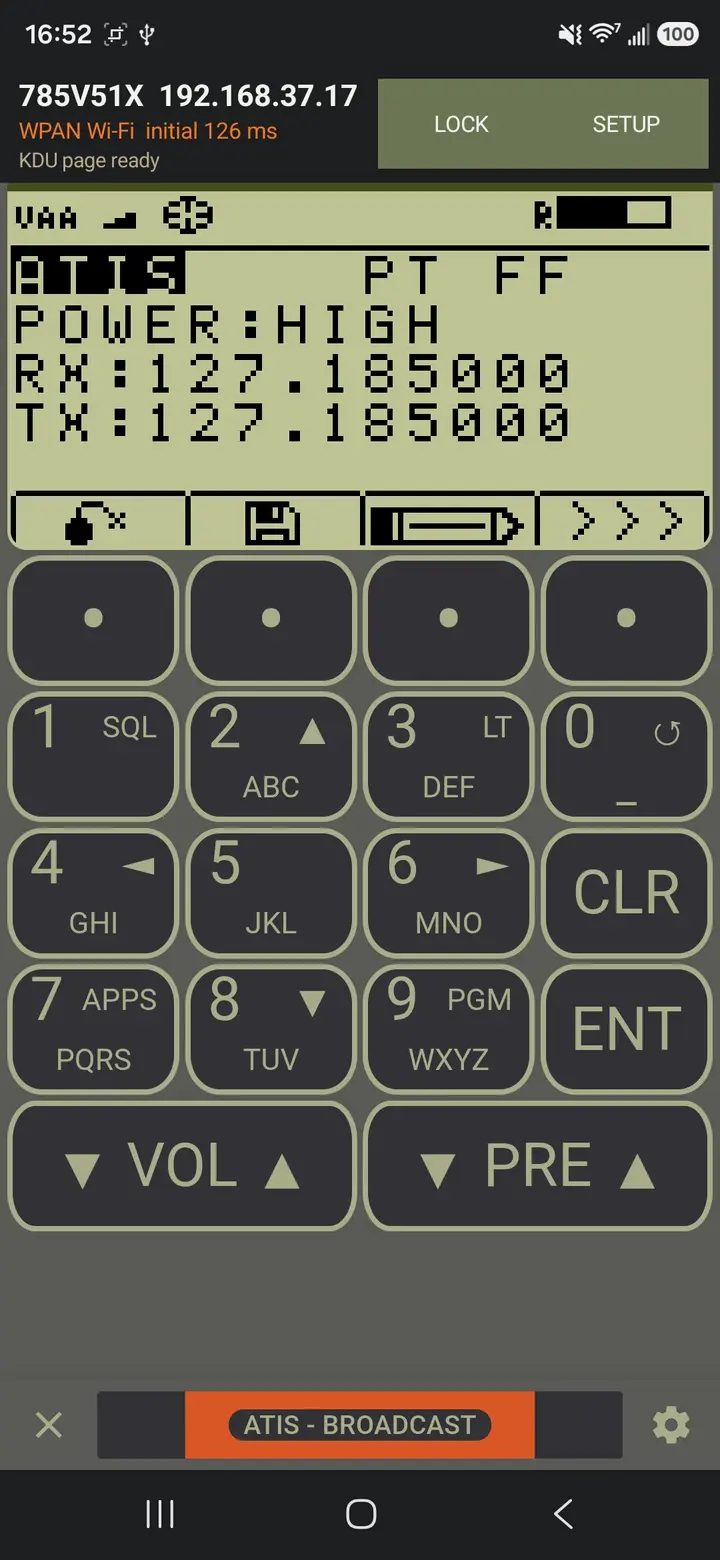
Virtual KDU on Android
Saved radio profiles
Invitation-only beta
Core capabilities
Use the functions in your radio’s Web UI from a screen you can keep within reach. The available controls depend on your radio, firmware, and network setup.
Operate the radio’s keypad and read its display on your Android phone or EUD.
Upload files from your phone through the radio’s Web UI, or save downloaded files to the phone.
Use the phone’s microphone and camera with supported radio Voice and Video Call functions. Android permissions and a suitable network connection are required.
Save profiles for different radios, open the radio’s Force Tracker page, and export an optional diagnostic log when something needs investigating. Online map imagery needs a suitable internet connection.
How it connects
Connect the phone to your radio’s IP network using the appropriate data cable, adapter, or supported network link. Enter the radio’s IP address and Web UI credentials in Linkborne. The app then checks the connection, signs in, and opens the KDU.
 EUD
EUDIn development
I’m working on connection checks for saved radios and a Windows desktop app. If you use a different Harris radio with a Web UI, I’d like to hear about your setup.
Upcoming status indicators in Setup will show whether each saved radio address responds, so you can check the connection before signing in.
Checks use the IP addresses in your saved profiles. They do not search for nearby radios or verify your radio login.
The Windows app will bring the radio’s Web UI to your laptop or desktop, starting with Windows 11 on Intel and AMD 64-bit computers.
When testing opens, you’ll use a Windows invitation to download and activate the app on one computer.
About the Windows appCurrent testing centers on the RF-7850M family. I’m interested in testing other Harris radios with a Web UI, along with more Android phones and tablets.
A Web UI is a starting point; support still depends on the model, firmware, and connection.
Tell me about your setupThere are no plans for an iPhone, iPad, or Mac app.
Before you connect
Linkborne works through the radio’s existing Web UI. Current beta testing focuses on the L3Harris RF-7850M family. Other Harris radios with a Web UI may be suitable for evaluation; compatibility depends on the model, firmware, available functions, and connection.
Evaluating another setup? Send the radio model, firmware, Android version, and connection type to info@linkborne.com.
Private beta
Linkborne is currently available by invitation. Approved testers receive a private download code for one Android or Windows installation. The invitation sets the access duration; the app shows when access expires.
Receive a codeYour invitation includes a unique Linkborne beta code.
Download securelyThe code creates a short-lived download link with limited attempts.
Activate one deviceActivate online after installation. Access starts at first activation and lasts for your invitation’s term.
Private beta
Checking availabilityChecking download availability.
Your temporary download link has expired. If you already used this invitation, contact beta support for help. Your app licence has not been restarted or shortened.
Individual and organizational licensing
Want to use Linkborne yourself or equip a team? Email your radio models, the phones or computers you plan to use, and how many licenses you need.
Linkborne is still in private beta. Pricing and a release date have not been set, but you can get in touch now about testing and future purchases.
Inquire about licenses info@linkborne.comCommon questions
No. Linkborne is being developed for Android and Windows, with no plans for an Apple app.
No. The phone controls and uses functions of a connected, compatible radio. The radio supplies the radio link and services; Linkborne supplies the Android interface.
You need internet to download and activate the beta. Once activated, the app can operate on the radio network offline through the license expiry shown in the app. Online map imagery and sending website feedback need internet.
That depends on your complete setup. Start with the compatibility notes above, then contact info@linkborne.com with your radio model, firmware, phone, and connection type before planning a wider deployment.
No. Linkborne is independently developed and is not affiliated with or endorsed by L3Harris Technologies. Equipment names identify the radios being evaluated.